When you start working with real data in Azure Databricks, one of the first challenges you face is getting your data into the environment. Your data typically lives in Azure storage — a Data Lake or Blob Storage account — and your Databricks notebooks need a way to access it. Mounts are the classic solution to this problem. They create a shortcut inside Databricks that points to your external storage, making cloud storage feel like a local directory. This guide walks through everything from the underlying file system concepts to the full step-by-step setup, including creating the Azure resources, securing credentials, and mounting the storage.
Category: Databricks
Notebooks are where you do your actual work in Azure Databricks. They are interactive documents that combine live code, visualizations, and narrative text in a single place. Whether you are exploring data, building pipelines, training models, or documenting your analysis, notebooks are the primary interface you will use every day. This guide covers everything you need to know to work effectively with Databricks notebooks, including magic commands and the powerful Databricks Utilities (dbutils) framework.
Clusters are the computational backbone of Azure Databricks. Every notebook you run, every pipeline you execute, and every query you submit needs a cluster behind it to do the actual work. If you’re getting started with Databricks, understanding clusters — what they are, how to configure them, and how to manage them efficiently — is one of the most important foundations you can build. This guide walks through everything you need to know.
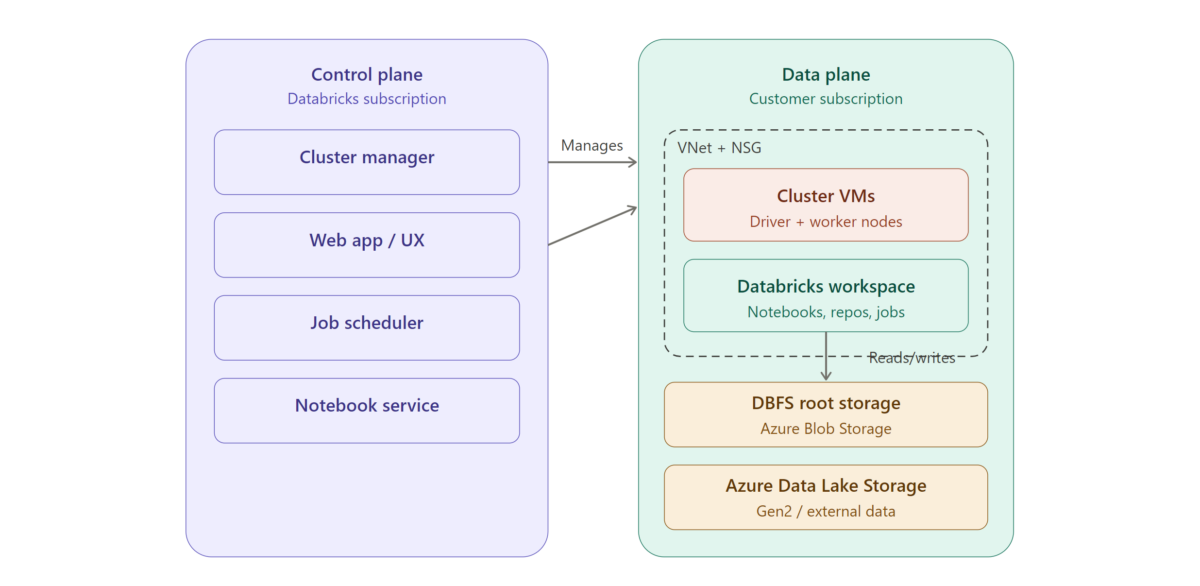
Azure Databricks is a cloud-based data analytics platform built on Apache Spark, optimized for Microsoft Azure. Understanding its architecture is essential for anyone looking to build scalable data pipelines, perform advanced analytics, or implement machine learning workflows in the Azure ecosystem. This guide breaks down the core components of Azure Databricks architecture so you can confidently start building.