
Azure Databricks is a cloud-based data analytics platform built on Apache Spark, optimized for Microsoft Azure. Understanding its architecture is essential for anyone looking to build scalable data pipelines, perform advanced analytics, or implement machine learning workflows in the Azure ecosystem. This guide breaks down the core components of Azure Databricks architecture so you can confidently start building.
What Is Azure Databricks?
Azure Databricks is a unified analytics platform that combines the best of Databricks and Azure cloud services. It provides a collaborative environment where data engineers, data scientists, and analysts can work together on data processing, transformation, and modeling — all within a managed Apache Spark environment. Microsoft and Databricks jointly developed the service, which means it integrates natively with Azure Active Directory, Azure Storage, Azure Synapse Analytics, and other Azure services.
Core Components of Azure Databricks Architecture
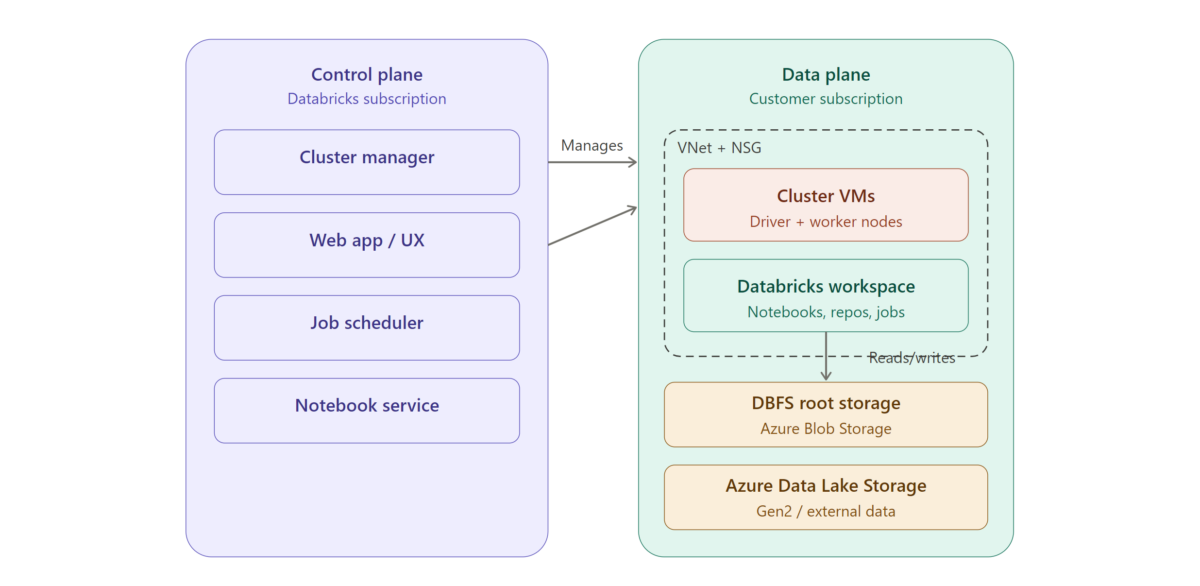
Azure Databricks architecture is split across two broad planes: the control plane and the data plane. Understanding how these two planes interact is central to understanding the platform.
The Control Plane
The control plane is managed by Azure Databricks itself. It hosts the backend services that keep the platform running, including the workspace application, notebook infrastructure, cluster management, and job scheduling. When you log into Azure Databricks and create a notebook or launch a cluster, those requests are handled by the control plane. Importantly, your raw data does not reside here — the control plane orchestrates operations but delegates actual data processing to the data plane.
The Data Plane
The data plane is where your data is processed. When you spin up a cluster, the virtual machines that make up that cluster live in your own Azure subscription. This means your data stays within your Azure tenant and never leaves your network boundary unless you configure it to. The data plane reads from and writes to your Azure data sources — such as Azure Data Lake Storage Gen2, Azure Blob Storage, or Azure SQL Database — and executes Spark jobs on the cluster nodes.
This separation gives you two key benefits: Databricks handles operational complexity (updates, patches, scaling logic), while you maintain ownership and control over your data.
Workspaces
A workspace is the top-level organizational unit in Azure Databricks. It provides a shared environment where teams collaborate on notebooks, dashboards, libraries, and experiments. Each workspace maps to a specific Azure region and resource group. Within a workspace you’ll find notebooks for writing code in Python, SQL, Scala, or R; folders for organizing assets; repos for Git integration; and access controls for managing permissions.
For most organizations, workspaces are organized by team, environment (development, staging, production), or domain.
Clusters
Clusters are the compute engine behind Azure Databricks. A cluster is a set of Azure virtual machines configured to run Apache Spark. There are two types to understand.
All-Purpose Clusters are designed for interactive workloads. You create them manually, they stay running until you terminate them, and they’re ideal for development, ad-hoc analysis, and notebook collaboration. Multiple users can attach to the same all-purpose cluster simultaneously.
Job Clusters are created automatically when a scheduled job runs and are terminated as soon as the job completes. They’re cost-efficient for production pipelines because you only pay for compute while the job is active.
Clusters also support autoscaling, which means Azure Databricks can dynamically add or remove worker nodes based on workload demand. This helps balance performance with cost.
Databricks Runtime
Every cluster runs a version of the Databricks Runtime, which is a tuned distribution of Apache Spark bundled with additional libraries and performance optimizations. There are several runtime variants: the standard runtime for general workloads, the Machine Learning runtime (which includes popular ML frameworks like TensorFlow, PyTorch, and scikit-learn pre-installed), and the Photon runtime, which is a high-performance query engine optimized for SQL and data lake workloads.
Choosing the right runtime matters. If you’re building ML models, the ML runtime saves significant setup time. If you’re running heavy SQL transformations on large datasets, Photon can deliver meaningful speed improvements.
Unity Catalog and Data Governance
Unity Catalog is the governance layer for Azure Databricks. It provides a centralized metadata store that lets you manage access to data assets — tables, views, volumes, and models — across multiple workspaces. Unity Catalog enforces fine-grained permissions, supports data lineage tracking, and enables auditing of who accessed what data and when.
For organizations that care about compliance and security (which should be all of them), Unity Catalog is a critical piece of the architecture. It sits on top of your data plane and integrates with Azure Active Directory for identity management.
Delta Lake
Delta Lake is the default storage format in Azure Databricks and a foundational part of the architecture. It adds reliability and performance features on top of standard Parquet files stored in your data lake. Key capabilities include ACID transactions (so concurrent reads and writes don’t corrupt data), schema enforcement and evolution, time travel (querying previous versions of your data), and optimized file management through compaction and Z-ordering.
When people refer to the “lakehouse architecture” in the context of Azure Databricks, they’re describing the combination of Delta Lake’s reliability with the openness and scalability of cloud object storage. It aims to give you the best of both data warehouses and data lakes.
How Data Flows Through the Architecture
A typical data flow in Azure Databricks looks something like this. Raw data lands in Azure Data Lake Storage Gen2 — this might come from event streams via Azure Event Hubs, file drops, or API ingestions. A Databricks job cluster picks up that raw data, runs transformations (cleaning, joining, aggregating), and writes the results back to the data lake in Delta format. This follows the common bronze-silver-gold pattern: bronze for raw ingestion, silver for cleaned and conformed data, and gold for business-ready aggregates. Downstream consumers — BI tools like Power BI, ML training pipelines, or Azure Synapse — then query the gold layer.
The entire flow can be orchestrated using Databricks Workflows, Azure Data Factory, or a combination of both.
Networking and Security
Azure Databricks supports several networking configurations to meet enterprise security requirements. You can deploy Databricks into your own Azure Virtual Network (VNet injection), which gives you control over inbound and outbound traffic. Private Link support ensures that traffic between the control plane and data plane never traverses the public internet. Network Security Groups and firewall rules let you restrict access further.
On the identity side, Azure Databricks integrates with Azure Active Directory for single sign-on and uses role-based access control at the workspace, cluster, and data levels.
Getting Started
If you’re new to Azure Databricks, the fastest path forward is to provision a workspace through the Azure portal, create a small all-purpose cluster, and start experimenting with a sample notebook. Azure provides free trial credits, and Databricks offers a community edition for learning. Focus first on understanding how clusters, notebooks, and Delta tables interact — that foundational knowledge will serve you well as you move into more advanced topics like streaming, MLflow, and production pipeline orchestration.
Wrapping Up
Azure Databricks architecture is designed around a clean separation of concerns: the control plane handles orchestration, the data plane handles processing, and your Azure storage holds the data. Layers like Unity Catalog, Delta Lake, and the Databricks Runtime add governance, reliability, and performance on top of that foundation. For beginners, the most important takeaway is that every piece of the architecture exists to make large-scale data work more manageable — and once you understand how the pieces fit together, the platform becomes far less intimidating.